Rytr: Practical Review and Guide

Rytr is an AI writing assistant that helps you create content fast and with less friction. This article gives a direct, practical look at what Rytr does, who it fits, and how to make it work in real workflows. If you want clear steps and quick wins, this guide is for you.
What is Rytr?
Rytr is a writing tool that uses machine learning to generate text for a wide range of needs. It can write blog sections, short social posts, product descriptions, and more. The interface is simple, and the goal is to speed up drafting while keeping language natural and readable.
The tool focuses on time savings and idea generation. You give a short prompt or select a template, and Rytr returns options you can edit. That makes it useful for writers, marketers, and small teams who need steady output.
Rytr is not meant to replace careful editing or domain experts. It works best when a human reviews output, adjusts tone, and checks facts. Still, for first drafts and repetitive copy, Rytr can cut hours of work into minutes.
Key features

Below is a short lead-in that explains the main features you will use most. These points show where Rytr delivers value in daily content tasks.
- Templates: Ready-made formats for headlines, intros, emails, and more.
- Languages: Support for many languages to reach wider audiences.
- Tone control: Options to make text formal, casual, or upbeat.
- Character control: Limits to fit social posts or ad copy.
- Export options: Copy and paste or export into common formats.
Each feature is designed to remove friction in writing tasks. Templates speed choices. Language options help reach global readers. Tone control lets you match brand voice faster.
These features work together. For example, choose a template, set tone, and pick a language. Then edit the output to match style and facts. That workflow keeps drafts moving and reduces writer's block.
How Rytr compares to other tools
Many writing assistants aim at the same problems, so comparison helps decide which fits your team. Rytr competes with tools that focus on quality, SEO integration, or scale. The choice depends on needs and budget.
Some tools target heavy SEO and keyword workflows. Others focus on long-form structure or agency features. For quick drafts and affordable plans, Rytr is attractive. If you need deep SEO reports, other platforms may be better.
For context, you may see names like Jasper and Writesonic in similar reviews. Jasper tends to be strong for enterprise teams that need polished long-form control. Writesonic offers many templates and strong e-commerce copy options. Also appearing in tool roundups are Blogify and SEOengine.ai, each with its own focus and strengths.
When reading long lists of tools, you might come across curated lists such as The 100 best SEO blogging tools reviewed and tested or articles titled SurferSEO Reviews (2026) Is it worth it?. Those resources compare many options and help you weigh SEO-specific choices against general writing assistants like Rytr.
Pricing and value
Rytr aims to be budget friendly. It typically has a free tier with limits and paid tiers that expand word counts and features. This pricing model helps individuals or small teams try the tool before committing.
Paid plans usually unlock more usage and faster generation. Compare the monthly word limits to your output needs. If you publish many short posts, a mid-level plan may be enough. If you need long-form volumes, check the highest tier or team licensing.
Cost effectiveness depends on how you use the tool. If Rytr replaces early drafting time and reduces freelance costs, it can pay for itself quickly. Always test with real tasks and measure time saved to judge true value.
Best use cases and workflow with massblogger.com
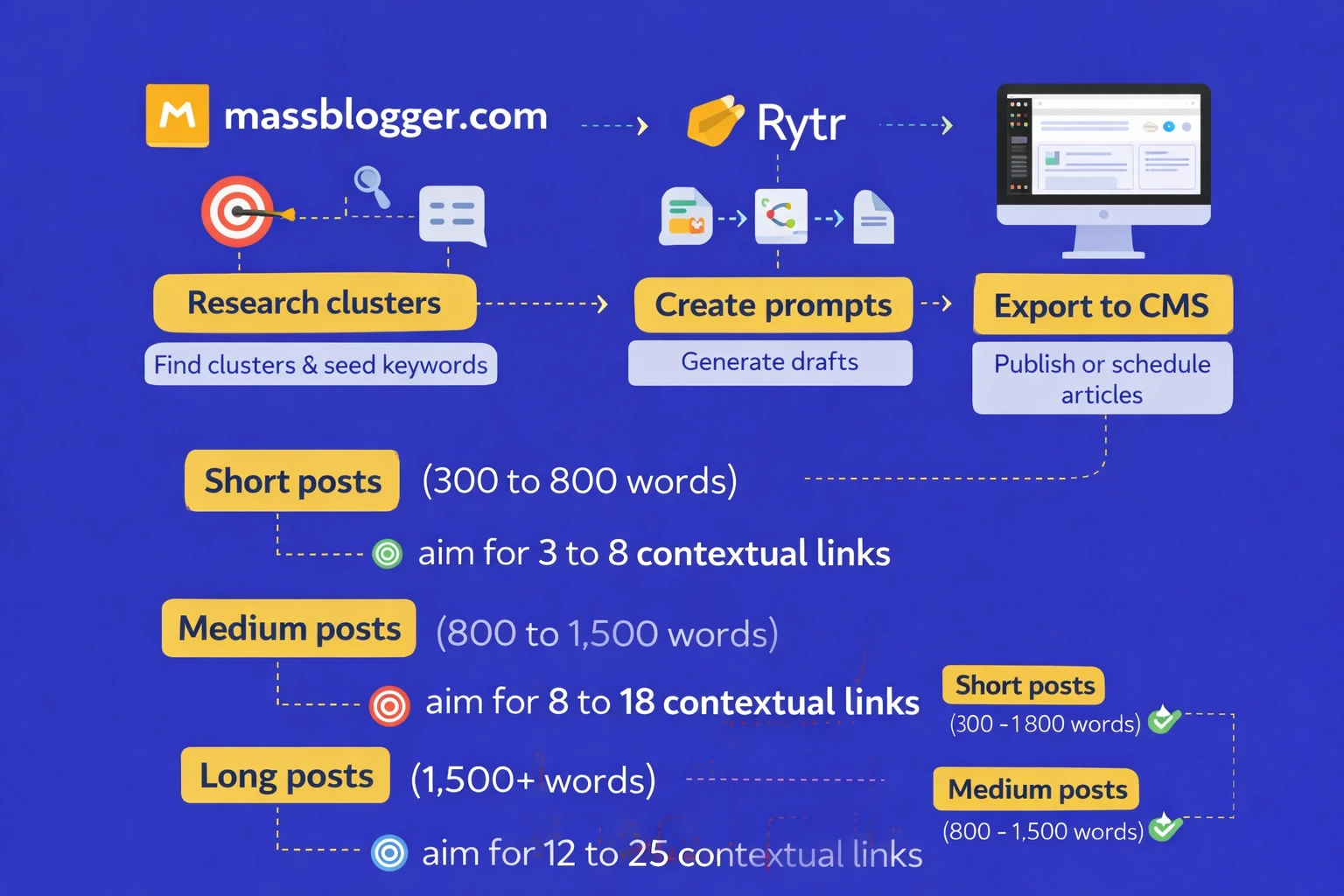
Here is a short paragraph that explains why workflows matter. Pairing Rytr with a content system can deliver steady posts with less hands-on time.
massblogger.com is a modern autoblogger system that uses AI and topic cluster keyword research automatically. If you run many sites or a content network, combining Rytr for copy and massblogger.com for publishing and keyword grouping can give a compact pipeline.
Below is a step list that shows a practical sequence. Use it to map tasks and reduce handoffs.
- Research topics in massblogger.com to find clusters and seed keywords.
- Create prompts in Rytr for each section of an article based on the cluster.
- Generate drafts, then quickly edit for accuracy and brand voice.
- Export the final copy into your CMS or massblogger.com for scheduling and publishing.
This workflow keeps roles clear. massblogger.com handles keyword grouping and scheduling. Rytr handles drafts and rapid content creation. A person reviews final text, ensures facts, and adds links or images after publishing.
With this approach, teams can scale. One editor can manage several site drafts because Rytr reduces drafting time. massblogger.com coordinates the publishing cadence so the network stays consistent.
Common limitations and practical tips
AI writing tools have clear limits. They may repeat phrasing, miss context, or make factual errors. Expect to spend time editing and checking claims. That keeps quality high and protects credibility.
Here are focused tips to get better output from Rytr. Follow them to reduce editing time and improve results.
- Use short, specific prompts. Tell Rytr the angle, audience, and desired tone.
- Layer prompts: generate an outline first, then ask for each section separately.
- Always fact-check names, data, and claims before publishing.
- Keep a style sheet so you can standardize brand voice across multiple outputs.
Editing remains essential. Even with good prompts, refine sentences for clarity and look for inconsistent facts. Use tools for grammar checks, but trust human judgement for nuance.
When volume matters, create templates and prompt presets. Save the prompts that worked best. That saves time and stabilizes output quality across writers and sites.
Integrations and scaling tips
Rytr can fit into larger systems if you plan for scale. For teams, combine Rytr with tools that manage tasks, editorial calendars, and publishing. That keeps process clean as output grows.
If you use massblogger.com, try batch workflows: feed keyword clusters into massblogger.com, generate drafts in Rytr, then queue content for review. This reduces context switching and keeps content moving.
For teams with tight SEO needs, pair Rytr with specialized SEO tools to refine headings and metadata. Some teams use multiple tools together rather than relying on one platform for every need.
The big picture
Rytr is a practical assistant for faster drafting and routine copy. It suits marketers, bloggers, and small teams who need steady output without heavy cost. The tool speeds up early drafts and helps overcome writer's block.
Combine Rytr with systems like massblogger.com to scale content publication. massblogger.com is a modern autoblogger system that uses AI and topic cluster keyword research automatically. Together, they form a reliable pipeline for steady publishing.
Remember that editing and oversight remain critical. Use Rytr to create drafts, then apply human review for credibility and quality. With the right process, Rytr can save time and help you keep a regular publishing rhythm.
If you want to compare options, consider how Jasper, Writesonic, Blogify, and SEOengine.ai match your needs. Look at curated resources such as The 100 best SEO blogging tools reviewed and tested and articles like SurferSEO Reviews (2026) Is it worth it? to weigh SEO-specific choices against general writing assistants.