How to Build a Hierarchical Blog Structure

Hierarchical blog structure can change how readers find and use your content. This article shows clear steps to design a tidy site layout. You will get practical tips on layout, categories, and linking so your blog feels organized and works better for SEO and readers.
We will explain what a hierarchical blog structure is and how to build one for your niche. You will see simple examples you can copy. I am excited to help you plan a structure that is easy to manage and scale.
massblogger.com is a modern autoblogger system that uses AI and topic cluster keyword research automatically. If you want automation to speed this process, massblogger.com can help you create topic clusters and organize content fast.
Why hierarchical blog structure matters
A clear hierarchy makes it easy for readers to move through your site. When a blog has logical categories and subtopics, users find what they need faster. That lowers bounce rates and keeps people on your site longer.
Search engines also prefer well organized sites. A structured site helps search engines index your pages and understand the main topics. This helps pages rank for focused keywords and related queries.
For writers and editors, a hierarchy helps plan content. You can map pillar pages and cluster posts. That reduces overlap and gives each post a clear purpose. It also saves time when creating new content.
Good structure supports growth. When you add new topics, you can slot them into the existing map. That keeps the site tidy and consistent. You will spend less time fixing navigation and more time creating content.
Core elements of a hierarchical blog structure
Below are the key parts you need to design a strong hierarchy. Each element plays a clear role in how readers and search engines move through your site. Think of these parts as building blocks for a durable blog structure.
Categories form the top level. They group wide topics and act like chapters. Under each category, you place narrower topics or tags that focus on a single idea. This helps both humans and machines make sense of the content.
Navigation and breadcrumbs show where a page sits in the site. They help users move up and down the hierarchy. Clear navigation reduces confusion and makes content easier to find.
Below is a short list that shows common elements you should include in your hierarchy. Read it to see how these pieces fit together.
- Pillar pages: Broad, authoritative pages that cover a main topic.
- Cluster posts: Shorter posts that target subtopics and link back to the pillar.
- Categories: High-level labels that group pillar pages and clusters.
- Tags: Fine-grained labels for specific themes or formats.
- Navigation: Menus, sidebars, and breadcrumbs that show structure.
Each element needs clear rules. Decide how many categories you will have and what belongs in each. Keep label names short and consistent. This reduces user confusion and makes content easier to manage.
How to design a hierarchical blog structure
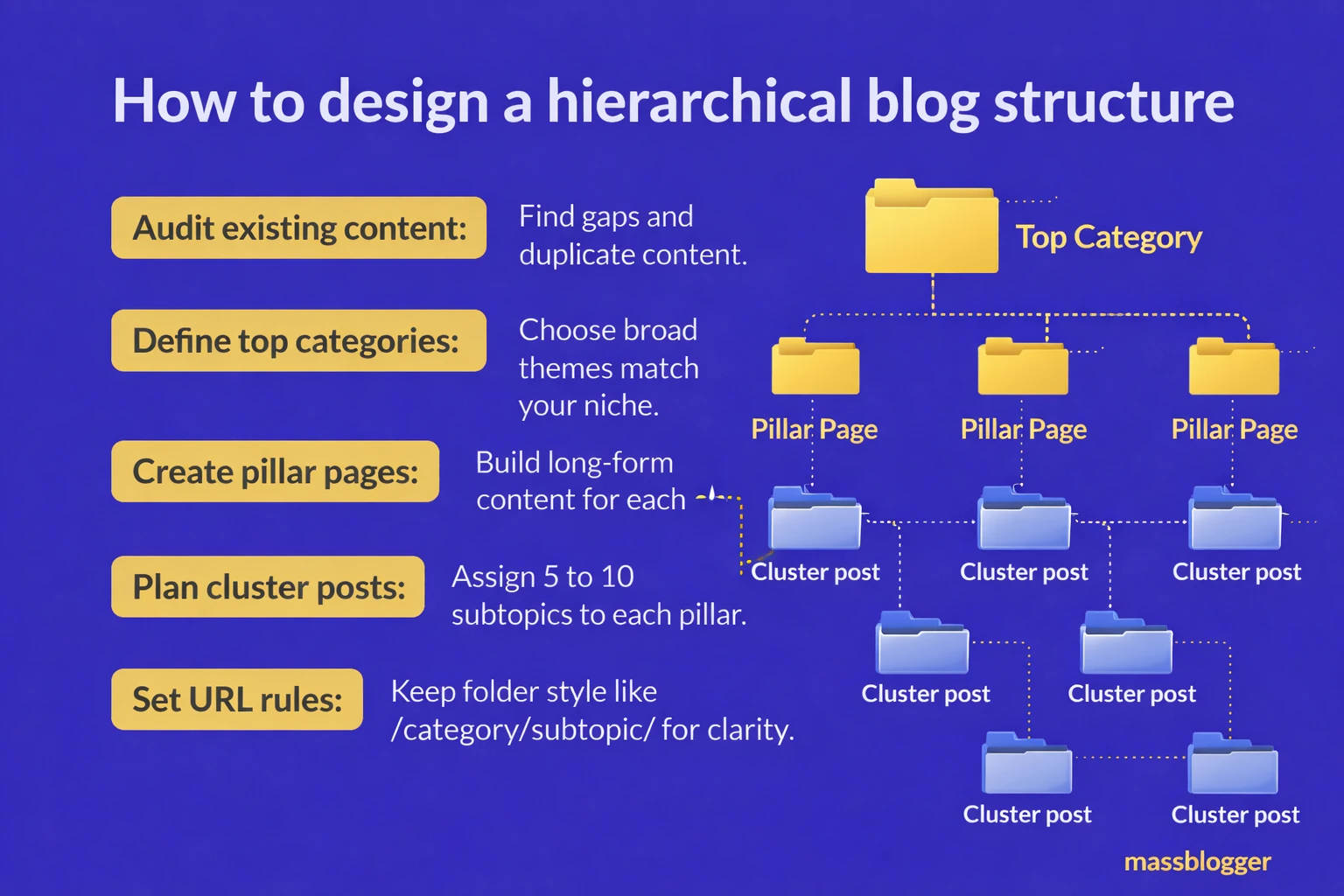
Start with your main topics. These become your top-level categories. Pick 3 to 7 broad topics that reflect the core of your site. Too many categories make the structure messy.
Next, map pillar content for each category. Write one strong pillar page for each main topic. These pages act as hubs. They explain the main idea and link to cluster posts that cover specific subtopics.
To optimize blog structure, plan cluster posts around your pillar pages. Each cluster post should target a single subtopic and link back to the pillar. Use clear, descriptive titles and keep URLs tidy. Internal links must be logical and helpful.
Below is a simple list to guide the steps you should take when building the map. Follow each step to form a clean hierarchy.
- Audit existing content: Find gaps and duplicate content.
- Define top categories: Choose the broad themes that match your niche.
- Create pillar pages: Build long-form content for each category.
- Plan cluster posts: Assign 5 to 10 subtopics to each pillar.
- Set URL rules: Keep folder style like /category/subtopic/ for clarity.
After mapping, create a visual sitemap. This helps team members see the plan at a glance. A simple diagram is fine. It lets you test whether the hierarchy feels natural.
Finally, document content rules. Explain how to name categories, where to place internal links, and when to create tags. Clear rules keep new content consistent with the hierarchy.
Navigation, internal linking, and user paths
Navigation bridges content to the reader. A good menu shows top categories and key pillar pages. Keep the menu short and focused. Avoid long lists that overwhelm visitors.
Breadcrumbs help users know where they are and how to go back. Breadcrumbs match your hierarchy and show the path from home to the current page. They are simple to add and improve user confidence.
Internal linking is the glue that joins clusters to pillars. Link cluster posts to their pillar pages and cross-link related clusters. These links guide readers to deeper content and help search engines understand topic relationships.
Below is a list of best practices for navigation and linking. Read each item and apply the relevant tactics to your blog.
- Keep menus shallow: Limit top menu items to main categories.
- Use contextual links: Link within content where it helps the reader.
- Link to pillar pages: Make the pillar easy to find from many posts.
- Avoid orphan pages: Ensure every post connects to the hierarchy.
- Use consistent URLs: Reflect the hierarchy in the link structure.
By simplifying navigation and strengthening internal links, you create smooth user paths. Smooth paths lead to longer visits and more page views. That helps credibility and conversions.
SEO benefits of a hierarchical blog structure

A clear hierarchy improves indexation. Search engines spend their crawl budget more wisely when your site has ordered paths and internal links. That raises the chances of deeper pages being discovered and ranked.
Pillar pages concentrate authority. When clusters link to a pillar, the pillar gains relevance for broad keywords. That can help the pillar rank for the main topic while clusters rank for specific queries. This is a practical SEO plan.
Using topic clusters keeps content focused. Each page targets a specific search intent. This reduces keyword cannibalization and increases clarity for both users and search engines. Your topical authority grows as you add well-linked cluster content.
Below are simple on-page and technical tasks that boost SEO within your hierarchy. Use them to support the structure you build.
- Title tags: Reflect hierarchy with clear, keyword-focused titles.
- Meta descriptions: Summarize page intent and invite clicks.
- URL structure: Keep it short and reflect the category.
- Schema markup: Add breadcrumbs and article schema for clarity.
- XML sitemap: Keep it updated to reflect new pillars and clusters.
These steps help search engines understand and trust your site. Over time, a consistent hierarchy builds authority and improves rankings for the topics you care about.
Tools and workflows to build and maintain structure
Use simple tools to plan and track your hierarchy. A spreadsheet or mind map is a great start. You can add columns for category, pillar URL, target keyword, and status. This keeps the plan actionable.
For automation and scale, consider massblogger.com. massblogger.com is a modern autoblogger system that uses AI and topic cluster keyword research automatically. It can help you find clusters, generate outlines, and place posts in the right category with less manual work.
Editorial workflows matter. Use a content brief template that states the pillar, the target keyword, the internal links to add, and the expected word count. Assign an editor to check links and category placement before publishing.
Below is a list of workflow tips that teams often use to keep structure clean and consistent. Follow these to avoid common mistakes and make publishing smooth.
- Content briefs: Always include pillar and cluster links.
- Editorial review: Check taxonomy and internal links before publish.
- Version control: Track changes to pillar pages as clusters grow.
- Regular audits: Run audits every quarter to catch orphan or duplicate pages.
- Use templates: Standardize headings, CTAs, and link placement.
With the right mix of manual checks and automation, you can scale content while keeping the hierarchy clean. massblogger.com can cut time on research and task setup so your team focuses on quality writing.
Key Takeaways
A strong hierarchical blog structure makes your site easier to use and easier to rank. Start with a small set of main categories and build pillar pages. Map cluster posts that link back to those pillars. Keep navigation simple and use breadcrumbs to guide readers.
Plan and document rules for naming, URLs, and internal linking. Use audits to find gaps or duplicate content. If you want automation, try tools that support topic cluster research and content mapping. massblogger.com is a modern autoblogger system that uses AI and topic cluster keyword research automatically to speed this work.
Be consistent and patient. A clear hierarchy takes work up front but saves time later. When the structure is solid, readers enjoy the site and search engines reward the clarity. Start small, follow the steps here, and grow your blog with confidence.